OpenAI provides enterprise-grade security controls, and most of what a security team needs is already documented: AES-256 encryption, TLS 1.2+ in transit, no training on business data by default, enterprise key management for eligible accounts, and recognized certifications through the OpenAI Trust Portal. The caveats matter just as much. Some features require case-by-case approval, certain API endpoints don’t support zero data retention, and eligibility varies by product tier. Before you sign anything, pull the Data Processing Addendum and request the current SOC 2 report yourself.
TL;DR:
- Confirm which endpoints support enterprise key management, as not all features qualify, and verify your KMS provider support before deployment.
- Regularly test retention, logging, and EKM accuracy in sandbox environments to ensure compliance before going live with sensitive workloads.
- Ensure RBAC, SCIM provisioning, and multi-factor authentication are fully configured and periodically reviewed to maintain least privilege principles.
- Request and review current SOC 2 Type 2 and ISO certifications directly from the Trust Portal, verifying scope and dates for your compliance needs.
- Clarify breach notification timelines in the Data Processing Addendum and integrate vendor incident procedures into your organization’s response plan.
Table of Contents
- What OpenAI Publishes About Its Enterprise Security Posture
- Encryption and Enterprise Key Management You Must Validate
- Data Handling: Training, Retention, and Zero-Data-Retention Caveats
- Access Controls and Admin Features for Least Privilege
- Compliance Artifacts and the Trust Portal: What to Request
- A Procurement, Pilot, and Production Checklist
- Incident Response and Breach Notification Procedures
- Vulnerability Management and Penetration Testing Practices
- User Access and Identity Lifecycle Management
- Physical Security Measures for Data Centers
- Integration With Existing Enterprise Security Infrastructure
- tekRESCUE’s Field Perspective: Common Pitfalls and Mitigations
- How tekRESCUE Turns This Checklist Into a Working Security Program
- Sources
What OpenAI Publishes About Its Enterprise Security Posture
OpenAI’s public commitments are more specific than most vendors offer, and they’re worth reading closely before your legal team drafts a single clause.
The baseline claim: OpenAI does not train its models on business inputs or outputs from ChatGPT Enterprise, Team, Edu, or the API platform by default. Organizations start opted out. API customers can opt back in through dashboard settings if they actually want their data used for training, but that’s a deliberate choice, not a default behavior.
On the cryptography side, OpenAI states it encrypts data with strong encryption at rest and in transit consistent with industry standards, which matches what you’d expect from any serious cloud vendor handling regulated workloads.
For procurement, three documents do the heavy lifting:
- The Trust Portal, where authenticated customers request SOC 2 Type 2 reports and ISO certificates
- The Data Processing Addendum (DPA), which spells out security measures and breach obligations
- The Business Associate Agreement (BAA), available for eligible customers handling protected health information
None of these get emailed to you automatically. You have to ask.
Encryption and Enterprise Key Management You Must Validate
Encryption claims sound reassuring until you ask who holds the keys. OpenAI’s default model handles key management internally, but Enterprise Key Management (EKM) lets qualifying customers bring their own keys through AWS KMS, Google Cloud KMS, or Azure Key Vault.
That’s a meaningful control for regulated industries, but it isn’t universal. Not every endpoint or feature supports EKM, so you can’t assume coverage extends across your entire deployment just because one workflow passed review.
Before you sign off on an architecture, confirm these three things:
- Whether the specific endpoints you plan to use are EKM-eligible
- Which of your existing KMS providers OpenAI actually supports, and what happens if yours isn’t on the list
- How key rotation and access logging behave in practice, not just on paper
Pro Tip: Don’t take a sales deck’s word for EKM coverage. Ask for the specific list of eligible endpoints in writing, then map that list against your planned use cases line by line.
Data Handling: Training, Retention, and Zero-Data-Retention Caveats
The no-training default is the headline, but retention behavior is where things get more nuanced.
By default, OpenAI generates abuse monitoring logs and retains them for up to 30 days, even for customers who’ve opted out of training. That’s a separate mechanism from model training, and it catches people off guard during audits.
Approved customers can apply for Zero Data Retention (ZDR) or Modified Abuse Monitoring, which reduces or eliminates that logging window. But approval isn’t automatic, and it isn’t universal:
- Some API endpoints remain ineligible for ZDR regardless of your account’s approval status
- Certain features retain “application state” temporarily to function correctly, a limitation noted in developer documentation
- Approval typically happens at the project or account level, not blanket-wide across your entire OpenAI footprint
If you’re running a high-compliance workload, don’t assume ZDR status carries over automatically when you spin up a new project. Verify it every time.
Access Controls and Admin Features for Least Privilege
Encryption and retention policies mean little if your access controls are loose. OpenAI’s enterprise tier includes the identity and governance features security teams actually ask for:
- SAML SSO for centralized authentication, with multi-factor authentication enforced on vendor identity flows
- SCIM provisioning to automate user lifecycle management as employees join, change roles, or leave
- Role-based access control (RBAC) to separate admin, member, and viewer permissions
- Audit Logs API and Admin API for pulling activity data into your own systems rather than relying on a vendor dashboard
Project-level separation also matters more than it sounds. You can isolate high-compliance workloads into their own project with tighter GPT and app controls, keeping a single misconfigured integration from exposing data across your whole enterprise account. That separation is a design decision your team has to make deliberately. It doesn’t happen by default.
Compliance Artifacts and the Trust Portal: What to Request
Every serious vendor review runs through a checklist of certifications, and OpenAI’s Trust Portal is built to answer that checklist directly rather than making you chase down a sales engineer.
What you should request:
- SOC 2 Type 2 report, current for the applicable audit period
- ISO/IEC certificates, including the 27001 family and 27701 for privacy management
- CSA STAR registry entry, useful if your organization already benchmarks vendors against that framework
- DPA and BAA documents, with particular attention to breach notification timelines, subprocessor lists, and data scope
Authenticated Trust Portal access is generally required to pull the actual SOC 2 report rather than a summary page. Don’t accept a marketing one-pager as a substitute for the real audit document. Read the scope and dates yourself before you present it to your compliance committee.
A Procurement, Pilot, and Production Checklist
Rolling out OpenAI across an enterprise works best as a staged process, not a single big-bang deployment.
- Pre-procurement: Ask directly about eligibility for data residency, EKM, and Zero Data Retention for your specific use cases. Get answers in writing before budget approval.
- Pilot: Stand up an isolated project, run retention tests with synthetic data, stream audit logs into your SIEM, and confirm SSO and admin API behavior under real conditions.
- Pre-production: Lock in RBAC roles, enable SCIM provisioning, apply conditional access policies, and finalize DPA and BAA language with your legal team.
- Operationalize: Build incident response runbooks specific to your OpenAI usage, and schedule periodic revalidation of contract terms and Trust Portal artifacts, since certifications expire and scopes change.
Pro Tip: Run a negative test during your pilot: submit synthetic sensitive data on purpose and confirm that retention, EKM, and logging behave exactly as the contract promises. If something doesn’t match, you want to find that out in a sandbox, not after a real incident.
Incident Response and Breach Notification Procedures
Every DPA review eventually comes down to one question: what happens when something goes wrong, and how fast do you hear about it?
OpenAI’s Data Processing Addendum sets out breach notification obligations as part of its contractual framework, which is the document your legal team should treat as authoritative rather than any general marketing claim about “enterprise-grade” incident handling. Read the specific notification timeline in your version of the DPA rather than assuming an industry-standard window applies. These clauses vary by contract tier and negotiated terms.
Your own incident response plan needs to account for a vendor relationship, not just internal systems. That means naming who on your team owns vendor incident coordination, defining what triggers an internal escalation the moment OpenAI notifies you of an issue, and building a communication template your legal and PR teams can execute without scrambling.
If you’re processing protected health information under a BAA, breach notification carries additional weight under HIPAA’s security and breach notification rules, which apply to business associates as well as covered entities. Confirm your BAA explicitly addresses how OpenAI notifies you of a security incident involving PHI, and on what timeline. Don’t assume a general DPA breach clause automatically satisfies HIPAA’s specific notification requirements. Ask your compliance counsel to check both documents against each other before you rely on either one alone.
Vulnerability Management and Penetration Testing Practices
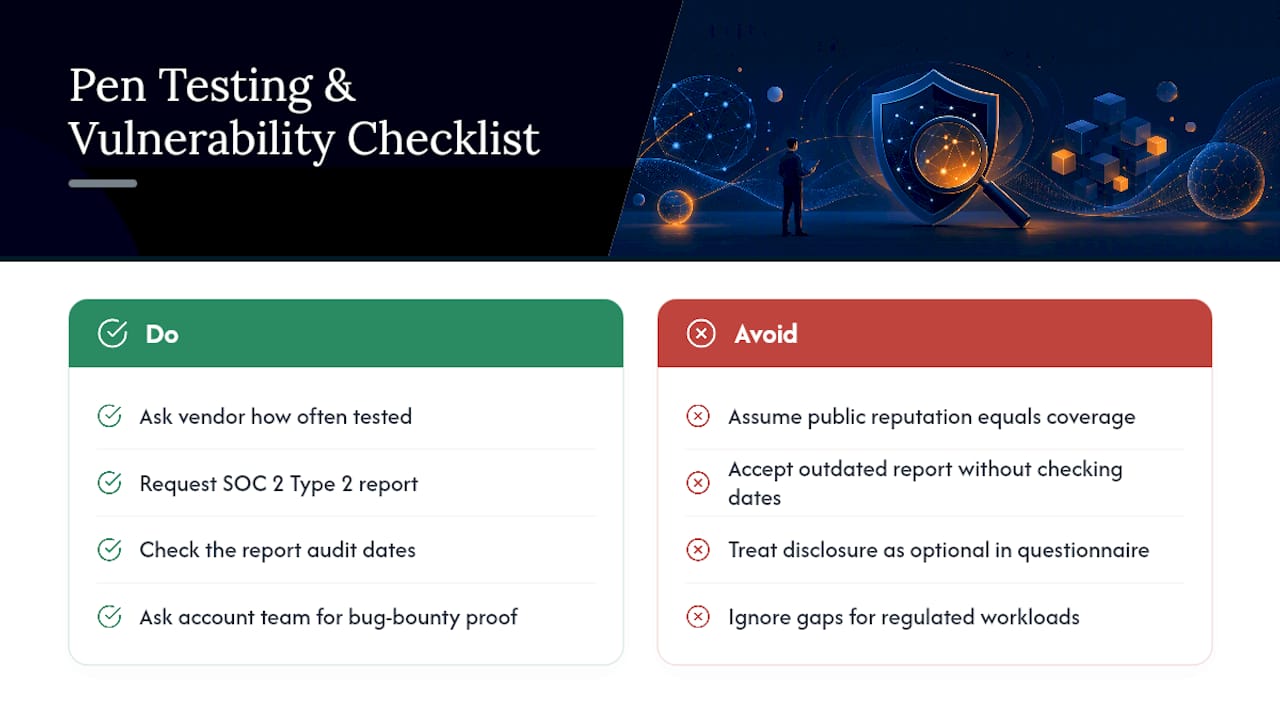
Security teams evaluating any AI vendor should ask a blunt question: how often is this thing tested, and by whom?
OpenAI doesn’t publish granular penetration testing schedules or vulnerability disclosure timelines in the same public detail as its encryption or access control documentation. What’s verifiable comes through the SOC 2 Type 2 report available on the Trust Portal, which typically covers security monitoring and control operation over an extended audit window rather than a single point-in-time snapshot.
That distinction matters for your own risk assessment. A Type 2 report demonstrates that controls operated effectively across months, not that a single audit day looked clean. When you request the report, check the audit period dates specifically, since Trust Portal listings are refreshed on a cycle and an outdated report tells you little about current practice.
If your organization requires evidence of a formal vulnerability disclosure program or bug bounty structure as part of vendor risk scoring, ask your OpenAI account team directly rather than assuming coverage based on general reputation. Enterprise vendors vary widely in how much of this process they disclose publicly versus under NDA, and OpenAI is no exception. Build that question into your standard vendor questionnaire rather than treating it as optional.
For workloads where a gap here is a dealbreaker, such as processing regulated financial or health data, treat the absence of published detail as a flag to escalate during contract negotiation, not something to quietly accept.
User Access and Identity Lifecycle Management
Getting someone access to your OpenAI enterprise account is the easy part. Getting them removed on their last day, correctly and completely, is where most enterprise deployments quietly fail.
SCIM provisioning automates the connection between your identity provider and OpenAI’s platform, so a termination in your HR system or Okta instance should propagate to OpenAI access without a manual ticket. That automation only works if you’ve actually configured it, though, rather than relying on SAML SSO alone for authentication while leaving deprovisioning as a manual step someone has to remember.
Role-based access control adds a second layer: even an active employee shouldn’t hold admin-level permissions on your OpenAI account unless their job genuinely requires it. Audit that role assignment quarterly, not once at setup and never again. Team turnover, role changes, and contractor offboarding create drift in permission structures faster than most security teams expect.
The Admin API and Audit Logs give you the visibility to check this drift yourself rather than trusting that provisioning worked as designed. Pull a permissions report periodically and compare it against your current org chart. If someone who left the company six weeks ago still shows active access, that’s a process failure worth escalating immediately, not a minor cleanup task for next quarter.
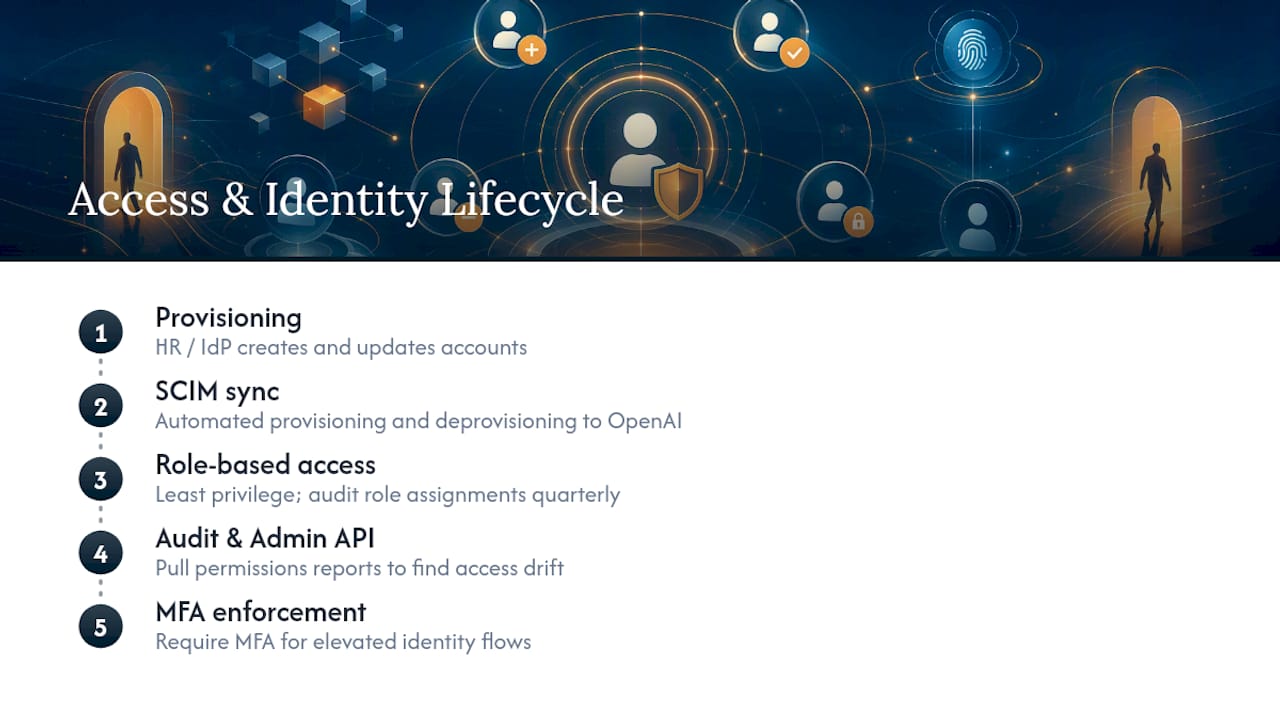
Multi-factor authentication enforcement on identity flows closes another common gap, particularly for accounts with elevated privileges that would otherwise represent a single point of failure if credentials leaked.
Physical Security Measures for Data Centers
OpenAI runs its infrastructure on established cloud providers rather than operating its own physical data centers, which means the physical security question largely inherits from the underlying hosting infrastructure those providers maintain.
That’s not a weakness by itself. Major cloud infrastructure providers generally maintain data center security practices covering controlled physical access, environmental monitoring, and redundancy that most enterprises couldn’t replicate on their own hardware. But it does mean your vendor risk assessment shouldn’t stop at OpenAI’s own documentation. Ask specifically which underlying infrastructure providers handle the physical layer for the regions and products you’re using, since data residency commitments tie directly to where that physical infrastructure sits.
For enterprises with strict data sovereignty requirements, this is where regional data residency options become relevant. Not every OpenAI product or plan supports residency guarantees in every region, and eligibility has expanded over time rather than existing uniformly across all account tiers from launch. If your compliance framework requires data to stay within a specific jurisdiction, confirm current residency support for your exact product and region combination before you assume coverage. Don’t rely on a general statement that “data residency is available” as sufficient proof for your own audit file. Get the specific regional commitment in writing.
Integration With Existing Enterprise Security Infrastructure
An OpenAI deployment that can’t talk to your existing security stack becomes a blind spot, no matter how good its native controls are.
The practical integration points are the Audit Logs API and Admin API, both of which allow you to pull activity and configuration data into whatever SIEM platform your security operations team already relies on for correlation and alerting. Rather than checking a separate OpenAI dashboard for anomalies, route that log data into the same pipeline you use for everything else, so an unusual pattern shows up alongside your other security signals instead of sitting isolated in a vendor portal nobody checks daily.
CASB integration works less directly, since OpenAI doesn’t publish a native CASB connector in the way some SaaS platforms do. Most enterprises handle this by treating ChatGPT Enterprise or API traffic as a monitored application within their existing CASB policy set, using network-level visibility and DNS controls rather than a purpose-built integration.
The bigger integration question is organizational, not technical: who owns monitoring OpenAI account activity day to day? If that responsibility isn’t assigned clearly, audit log data flows into your SIEM but nobody’s watching it. Build OpenAI-specific alert rules into your existing detection logic during the pilot phase, not as an afterthought once you’re already in production and something’s gone wrong.
tekRESCUE’s Field Perspective: Common Pitfalls and Mitigations
The mistake we see most often is assuming security features work the same way across every account, project, and endpoint. They don’t. A company confirms EKM support for one workflow, then assumes it covers everything else. Abuse monitoring retention gets overlooked because the no-training headline crowds out the details underneath it.
The fix is staged rollout: isolate high-compliance workloads into their own project, treat every new endpoint as unverified until tested, and write contractual guardrails into your DPA rather than trusting default settings to hold. Continuous verification beats a one-time approval every time.
— Randy Bryan
How tekRESCUE Turns This Checklist Into a Working Security Program
Reading a vendor’s documentation is one thing. Mapping it against your actual workflows, your compliance obligations, and your existing security stack is a different job entirely, and it’s the one most internal teams don’t have bandwidth for.
That’s where the AI Profit and Growth Assessment from tekRESCUE comes in. Instead of a generic security audit, you get a prioritized risk assessment specific to how your organization plans to use OpenAI’s tools, paired with a remediation roadmap and hands-on implementation support to close the gaps before they become incidents. An experienced AI partner combines cybersecurity background with practical AI deployment experience, so the recommendations you get are built to work with your existing infrastructure, not around it.
If you’re weighing a broader OpenAI rollout and want the risk side mapped out before you commit budget, book an AI Profit and Growth Assessment and get a clear picture of what needs attention first.
Sources
Start with the OpenAI Trust Portal and Enterprise Privacy page for current certifications and admin controls.