An internal AI chatbot is an employee-facing assistant that answers questions, pulls up policies, and cuts repetitive support tickets by connecting to your company’s own data. Its main payoff is fewer routine requests hitting your IT and HR teams. Start smaller than you think you need to: run a scoped pilot with a named owner, a capped audience, and basic security guardrails before you touch a company-wide rollout.
TL;DR:
- Focusing on high-volume, low-risk queries in pilot areas like IT password resets or HR benefits accelerates ROI and ensures measurable success early.
- Proper architecture requires connectors to core systems, role-based access controls, and a strict separation between model training and data retrieval to prevent leaks.
- Regular updates to policies, content, and access controls are vital for maintaining chatbot accuracy and security, avoiding trust erosion over time.
- Deployment success depends on narrow initial scope, honest metrics, clear ownership, and integrating governance into ongoing operations rather than treating it as an afterthought.
- Broad, uncontrolled launches often fail due to poor system integration, lax security, and lack of dedicated oversight, emphasizing the need for deliberate sequencing and accountability.
Table of Contents
- What Makes an Internal AI Chatbot Different From a Basic Bot or an AI Agent?
- Which Use Cases Deliver the Fastest ROI From an Internal Support Chatbot?
- How Should You Architect Connectors, Access, and Data Separation?
- How Do You Roll Out an Internal AI Chatbot Step by Step?
- What Security and Legal Safeguards Does an Internal AI Chatbot Actually Need?
- How Long Does a Rollout Take and What Should You Measure?
- How Do You Get Employees to Actually Use the Chatbot?
- How Do You Keep an Internal AI Chatbot Accurate Over Time?
- What Integration Problems Come Up With Existing Systems, and How Do You Fix Them?
- What Do Real Internal AI Chatbot Rollouts Get Right?
- tekRESCUE AI’s Practical Lessons From Deployments
- Sources
What Makes an Internal AI Chatbot Different From a Basic Bot or an AI Agent?
A rule-based chatbot follows scripted decision trees. Ask it something outside its flowchart, and it stalls. An AI-powered internal chatbot works differently: it uses a language model paired with retrieval augmented generation (RAG) to search your actual documents, wikis, and tickets, then answers in plain language grounded in that content.
RAG matters because it separates the model from your data. Instead of training the model on your files (which can bake sensitive information permanently into its weights), RAG retrieves relevant snippets at query time through knowledge connectors and feeds them into the answer. That separation is what lets you update or remove a document and have the chatbot reflect it immediately.
Agentic AI goes a step further. Rather than only answering, an AI agent executes workflows: resetting a password, filing a ticket, updating a record. That extra capability raises resolution rates but also raises the stakes, since a mistake now touches a live system instead of just a chat window. Choose a simple Q&A bot for information lookup. Choose an agent only once you have human checkpoints in place for anything that writes data.
Which Use Cases Deliver the Fastest ROI From an Internal Support Chatbot?
Pick one use case for your first pilot, not five. The best candidates share two traits: high ticket volume and repetitive, low-risk questions. That combination is what makes an automated employee chatbot pay for itself quickly rather than becoming a science project.
- IT helpdesk: password resets, software access requests, VPN troubleshooting. High volume, well-documented answers, minimal legal exposure.
- HR policy and benefits: PTO balances, open enrollment windows, parental leave rules. Employees ask the same handful of questions constantly.
- Onboarding: new-hire checklists, where to find equipment requests, who owns what. Concentrated demand in predictable bursts.
- Knowledge search: surfacing the right internal document instead of employees digging through five different drives.
- Workflow automation: routing approvals or triggering ticket creation, once you’re ready for agentic capability.
Internal AI chatbot deployments commonly cut information-search time by roughly 30 to 40 percent and reduce IT helpdesk ticket volume by as much as 40 percent, which is why IT and HR remain the two most common starting points. A mid-size company deflecting even a third of its password reset tickets frees up real hours for the IT staff handling actual incidents instead of routine resets.
How Should You Architect Connectors, Access, and Data Separation?
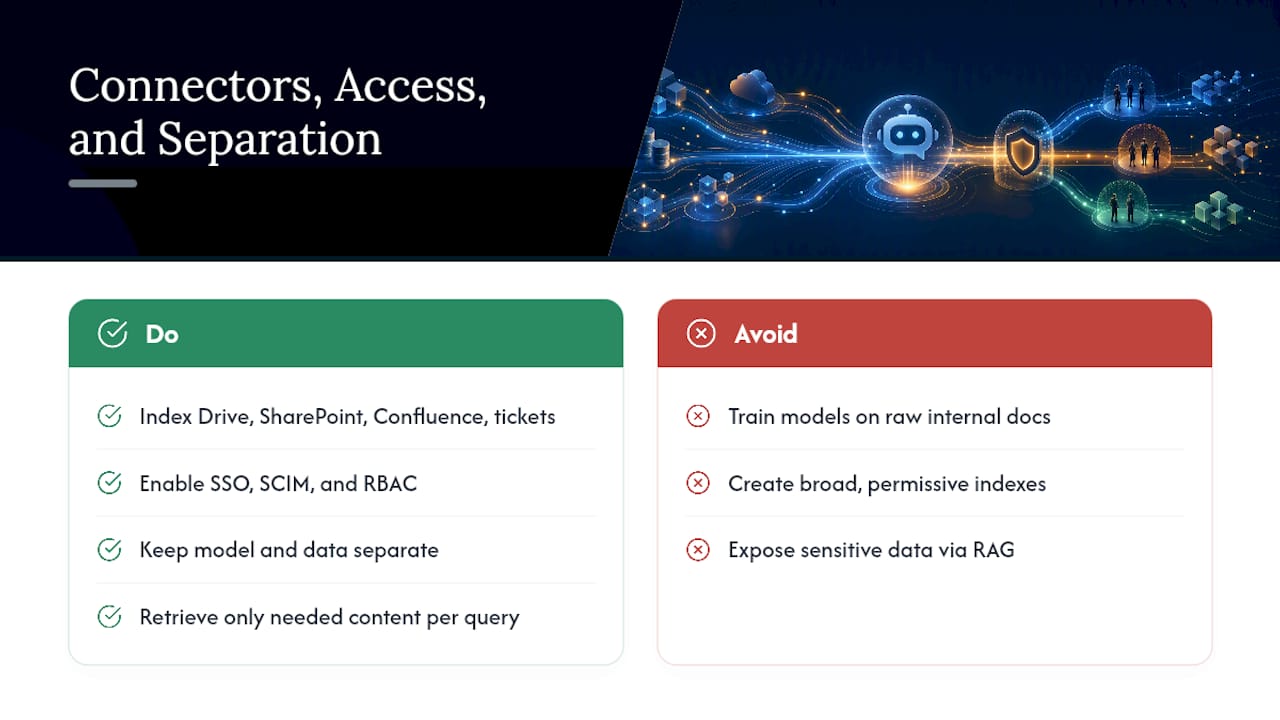
Your architecture decisions determine both what the chatbot can do and how much risk it carries. Start with connectors: most internal deployments index Google Drive, SharePoint, Confluence, and the ticketing system (Zendesk, ServiceNow, Jira) so the RAG layer has something real to retrieve from. Skipping this step is the single fastest way to end up with a chatbot that sounds confident and answers wrong.
Authentication and access controls matter just as much as the data itself. Single sign-on (SSO) confirms who’s asking, SCIM handles provisioning and deprovisioning automatically as people join or leave, and role-based access control (RBAC) makes sure a chatbot answering a finance question doesn’t also expose payroll records to someone in marketing. Skip any of the three, and you’ve built a search engine for your most sensitive files.
The bigger architectural fork is model training versus model-data separation. Training a model directly on internal documents can bake sensitive content into the model itself, and hasty adoption of internal AI tools risks exposing proprietary or confidential information through model outputs or careless RAG configuration. Keeping the model and your data separate, and retrieving only what’s needed per query, contains that risk. Hallucinations and leakage both trace back to the same root cause: an index that’s too broad, too permissive, or too poorly curated.
How Do You Roll Out an Internal AI Chatbot Step by Step?
A rollout is a governance project wearing a software costume. Treat it that way from day one, and the technical part gets easier.
- Pick one pilot use case and define success metrics up front. Resolution rate, escalation rate, and CSAT are the three numbers that matter most in early stages.
- Assemble a cross-functional team and name a single owner. IT, HR or the relevant department, legal, and security all need a seat, but one person owns the outcome and reports on a set cadence.
- Run vendor diligence as a legal and security exercise, not procurement paperwork. Demand contract language covering data processing, explicit limits on the vendor training on your data by default, incident response timelines, and data handling standards.
- Cap the pilot audience. Practitioners commonly start with 5 to 10 percent of the eligible population, watch resolution and escalation rates closely, and expand only once those numbers hold steady.
- Build in human checkpoints and prelaunch testing. Run adversarial questions against the bot before real employees do. Clean up the RAG index so it excludes anything sensitive that shouldn’t be retrievable.
- Set go/no-go criteria tied to the metrics you picked in step one, not to gut feel.
Pro Tip: Write your go/no-go thresholds down before the pilot starts, not after you see the results. Teams that decide the bar after the data comes in almost always move the bar.
What Security and Legal Safeguards Does an Internal AI Chatbot Actually Need?
Chat transcripts aren’t throwaway data. Internal AI chatbot logs can become discoverable evidence in litigation, and courts haven’t settled how privilege applies to AI interactions, especially across jurisdictions. That alone justifies retention policies that don’t just default to “keep everything forever.”
The practical checklist looks like this:
- Classify data by sensitivity before it ever enters the RAG index, and exclude anything proprietary from retrieval rather than trying to redact it after a leak.
- Enforce least-privilege access so the model only retrieves what a given employee’s role permits.
- Require vendor contracts that specify data processing terms, limits on model training, security standards (look for SOC 2 compliance), and incident response commitments.
- Treat prompts and guardrails as versioned infrastructure with audit trails, not a one-time configuration you set and forget.
- Log every interaction for periodic audit review, and build in defenses against prompt injection, since guardrails themselves have become an active attack target.
- Give employees clear notice about what the chatbot logs, list prohibited inputs (client data, health information, anything privileged), and define escalation triggers.
Enterprise rollouts commonly fail for a specific, avoidable reason: security gets bolted on after launch, the rollout is too broad from the start, and no one owns ongoing oversight. An AI use-case registry and a data-flow map aren’t bureaucratic overhead. They’re the artifacts that let you answer “what does this thing have access to” without guessing.
How Long Does a Rollout Take and What Should You Measure?
Track three numbers from week one: resolution rate (did the bot solve it without a human), ticket deflection (how many tickets never got filed because the bot handled it first), and escalation or false-positive rate (how often the bot got it wrong or punted). CSAT rounds those out by capturing whether employees actually liked the experience, not just whether the metrics looked clean.
Timelines vary more than most vendors admit. A narrow pilot, one use case, one department, a handful of connectors, can go from kickoff to live testing in a matter of weeks. Enterprise-wide integrations and complex setups typically require several months before scaling past the pilot group.
Costs track connector count and integration complexity more than anything else. A bot answering questions from a single knowledge base costs far less to stand up than one wired into your ticketing system, HRIS, and identity provider simultaneously. Some vendors price per user, others price per domain or per connector; know which model you’re buying before you sign anything. When you present ROI to leadership, tie every dollar back to the metrics you set at pilot launch, and frame the request as funding the next iteration, not a one-time purchase.
How Do You Get Employees to Actually Use the Chatbot?
The best internal AI chatbot in the world is worthless if employees route around it out of habit. Adoption is a change management problem first and a technology problem second.
Start with transparency. Tell employees what the chatbot can see, what it can’t, and what happens to their questions after they’re asked. People trust tools they understand and avoid tools that feel like a black box watching them.
Train department champions before the general rollout, not after. A handful of enthusiastic early users in IT or HR who can answer “how do I actually use this” questions from their peers will do more for adoption than any company-wide email announcement. Give them real scenarios to test during the pilot so they can vouch for it honestly instead of reading from a script.
Make the first interaction easy to succeed at. If someone’s first question to the bot gets a wrong or unhelpful answer, they may not try again for months. Seed the knowledge base with your highest-volume questions before launch, and monitor early conversations closely enough to catch and fix gaps within days, not quarters.
Set expectations about what the bot is for. An internal support chatbot that tries to answer everything, including questions it has no data to support, erodes trust fast. A narrower bot that reliably nails its lane earns trust that expands naturally as its scope grows.
How Do You Keep an Internal AI Chatbot Accurate Over Time?
A chatbot that’s accurate at launch degrades if nobody maintains it. Policies change, teams reorganize, software gets replaced, and the RAG index doesn’t update itself just because reality moved on.
Assign document ownership the same way you’d assign code ownership. Someone should be responsible for flagging when an HR policy update or IT procedure change needs to hit the knowledge base, and that update should happen within days, not whenever someone notices the bot is giving outdated answers.
Review escalation logs on a regular cadence. Every question the bot couldn’t answer, or answered wrong, is a data point about a gap in your index or a phrasing pattern your retrieval setup misses. Treat that log as your product roadmap, not just an error report.
Version your prompts and guardrails deliberately. Practitioners who treat prompt configurations as versioned infrastructure with rollback capability catch behavioral drift before it becomes a visible problem, and organizations that skip this discipline often end up rebuilding the entire assistant within a short time because trust eroded faster than anyone noticed.
Schedule periodic security audits alongside content audits. New connectors, new integrations, and new employees with new access levels all shift your risk surface, even if nothing about the chatbot’s core function changed.
What Integration Problems Come Up With Existing Systems, and How Do You Fix Them?
Most integration headaches trace back to one thing: internal systems weren’t built to talk to each other, let alone to a chatbot. Legacy ticketing platforms, older HRIS software, and departmental spreadsheets masquerading as databases all resist clean connection.
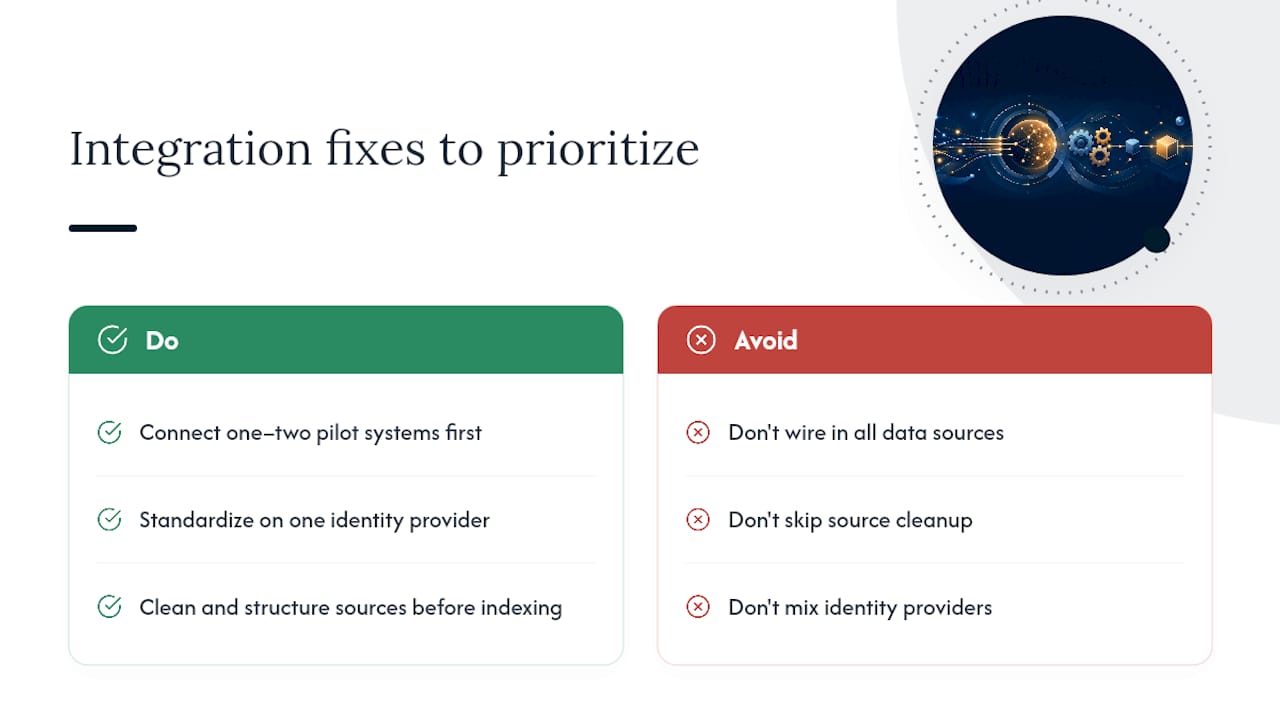
The fix usually isn’t a bigger integration budget. It’s sequencing. Connect the one or two systems your pilot use case actually needs first, get that pipeline solid, and resist the urge to wire in every data source simultaneously because “we’ll need it eventually.” A bloated initial integration is where most timelines blow past their two-to-six-month window.
Authentication mismatches cause a second common snag. If your ticketing system uses one identity provider and your document storage uses another, SSO configuration gets messy fast, and RBAC rules can drift out of sync between systems. Standardizing on a single identity provider before connecting additional data sources saves rework later.
Data format inconsistency is the quiet killer. A knowledge base full of PDFs, scanned documents, and inconsistent naming conventions gives your RAG pipeline poor material to retrieve from, regardless of how good the underlying model is. Cleaning and structuring source documents before indexing them matters more than most teams expect, and it’s cheaper to do that cleanup once upfront than to keep patching retrieval quality after launch.
What Do Real Internal AI Chatbot Rollouts Get Right?
The deployments that hold up over time share a pattern regardless of industry: they started narrow, measured honestly, and treated governance as part of the product rather than paperwork attached to it.
Organizations that succeed with IT helpdesk pilots typically report meaningful ticket deflection within the first few months, largely because password resets and access requests are exactly the kind of repetitive, well-documented volume that RAG-based retrieval handles well. The organizations that struggle tend to have skipped straight to a broad, multi-department launch without first proving the model in one contained use case.
A pattern worth copying: successful teams keep a living AI use-case registry and a data-flow map from day one, updating both as connectors get added. That single habit answers the “what does this bot have access to” question instantly during audits or incident response, instead of requiring a scramble to reconstruct it after something goes wrong.
The common thread across strong enterprise deployments isn’t a bigger budget or a flashier model. It’s a named owner who reports on resolution and escalation rates every month, and a governance cadence that catches drift before employees stop trusting the tool altogether.
tekRESCUE AI’s Practical Lessons From Deployments
Deploying an internal AI chatbot is infrastructure and governance work first, software configuration second. Every rollout that held up under scrutiny had cybersecurity built in from the first design conversation, not bolted on after a scare, and a named person accountable for ongoing oversight, not a committee that meets quarterly and forgets. If you’re weighing where to start, our AI Profit and Growth Assessment is built as the minimum viable deliverable before you touch a pilot: it maps your risks and your realistic upside before you write a line of rollout plan.
— Randy Bryan
Sources
- 10 Biggest Mistakes Businesses Make When Deploying AI Chatbots – And 10 Fixes You Can Make Today | Fisher Phillips LLP
- Before You Launch That AI Chatbot: Key Legal Risks and Practical Safeguards - Spencer Fane
- When AI guardrails become the target | Batten Institute
- Hasty adoption of internal AI tools can expose sensitive data - Bloomberg Law
- Enterprise AI Chatbot Guide: Security & ROI (2026) | EzyConn