Start here: pick one department, run a two-week AI readiness audit, then launch a 30-day pilot with three measurable goals before you write a single slide of curriculum. That’s the whole playbook in one sentence. Everything else in this guide fills in the details.
Here’s your first move, broken into three steps you can start this week:
- Assess (days 1-7): Survey one department about current AI tool use and comfort level. Assign an HR or L&D owner.
- Pilot (days 8-30): Run a small, role-specific training pilot with a defined success metric, not a company-wide rollout.
- Measure (day 30+): Compare baseline and post-pilot data on adoption, error rates, or time saved before scaling further.
Pause and escalate to legal or IT security if the pilot involves employees pasting client or patient data into external AI tools, or if leadership hasn’t publicly backed the initiative. Skipping that step is how well-meaning training programs turn into data-exposure incidents.
Key Takeaways
Effective AI training for employees combines role-specific curriculum, a measured pilot, and governance controls built before rollout, not after.
| Point | Details |
|---|---|
| Start with an audit | Run a two-week readiness assessment on one department before designing any curriculum. |
| Tie objectives to business metrics | Set KPIs like time saved, adoption rate, and error reduction before training begins. |
| Design role-specific pathways | Build separate learning tracks for customer service, finance, marketing, and operations. |
| Pilot before scaling | Run a 30 to 60 day pilot with predefined success criteria and a clear scale-or-pause decision. |
| Get governance right first | Establish acceptable use, data handling, and escalation policies before training launches. |
| Consider expert support for complex rollouts | tekRESCUE’s AI Profit & Growth Assessment pairs role-based training design with a security review for organizations managing sensitive data or multi-department rollouts. |
Frameworks and Resources Worth Reviewing
The Department of Labor’s AI Literacy Framework is the most authoritative public reference for structuring workplace AI literacy content, and it’s free to adapt for internal use. For deeper technical literacy modules, Harvard’s CS50 Introduction to Artificial Intelligence offers hands-on, project-based learning suitable for employees who need to go beyond surface-level familiarity. Nonprofit research from JFF is worth reviewing when building the business case for leadership, since it documents how many workers already expect to need new skills as AI reshapes their roles.
- Department of Labor AI Literacy Framework: foundational content areas and delivery principles
- CS50’s Introduction to Artificial Intelligence: free, project-based technical literacy
- JFF workforce research: employee-side data on skills demand
- Internal survey templates and dashboard metrics: build from the KPI table in this guide, or request one during an initial assessment
Table of Contents
- How Do You Assess AI Readiness Before Training Employees?
- What Learning Objectives Should Tie to Business Outcomes?
- How Do You Design a Role-Specific AI Curriculum?
- Which Training Delivery Methods Actually Drive Adoption?
- What Does a Realistic AI Training Pilot Look Like?
- What Policies Should Govern Employee AI Training?
- How Do You Measure the Impact of AI Training?
- Should You Build AI Training In-House or Hire a Consultant?
- How tekRESCUE Supports Responsible AI Training Rollouts
- Sources
How Do You Assess AI Readiness Before Training Employees?
You can’t design useful AI training for employees without first knowing who’s already using AI, for what, and how well it’s working. Most HR teams skip this step and build generic curriculum instead, which is why so many training programs get high attendance and low behavior change.
A rapid AI readiness audit takes one to two weeks. Scope it to a single business unit first, not the whole company, and pull in three stakeholder groups: frontline managers, IT or security leadership, and a sample of the employees who’ll actually take the training. You need three data points: current tool usage (sanctioned and unsanctioned), comfort level, and the specific tasks people wish AI could help with but don’t know how to approach.
Ask employees questions like these during structured interviews or a short survey:
- Which AI tools have you used at work, even informally, in the last three months?
- What task takes you the longest each week that feels repetitive?
- Have you ever hesitated to use an AI tool because you weren’t sure it was allowed?
- What would you need to trust an AI-assisted workflow for something client-facing?
Ask managers a parallel set focused on team output, error patterns, and which roles touch sensitive data. The goal is clustering, not individual scoring. Group roles into three or four learning pathways based on shared tasks and risk exposure, rather than department names.
| Role cluster | Primary AI use case | Data sensitivity | Training priority |
|---|---|---|---|
| Customer service | Response drafting, ticket summarization | Medium (customer PII) | High |
| Finance and accounting | Forecasting, reconciliation checks | High (financial data) | High |
| Marketing and content | Drafting, research, campaign analysis | Low | Medium |
| Operations and logistics | Scheduling, demand prediction | Medium | Medium |
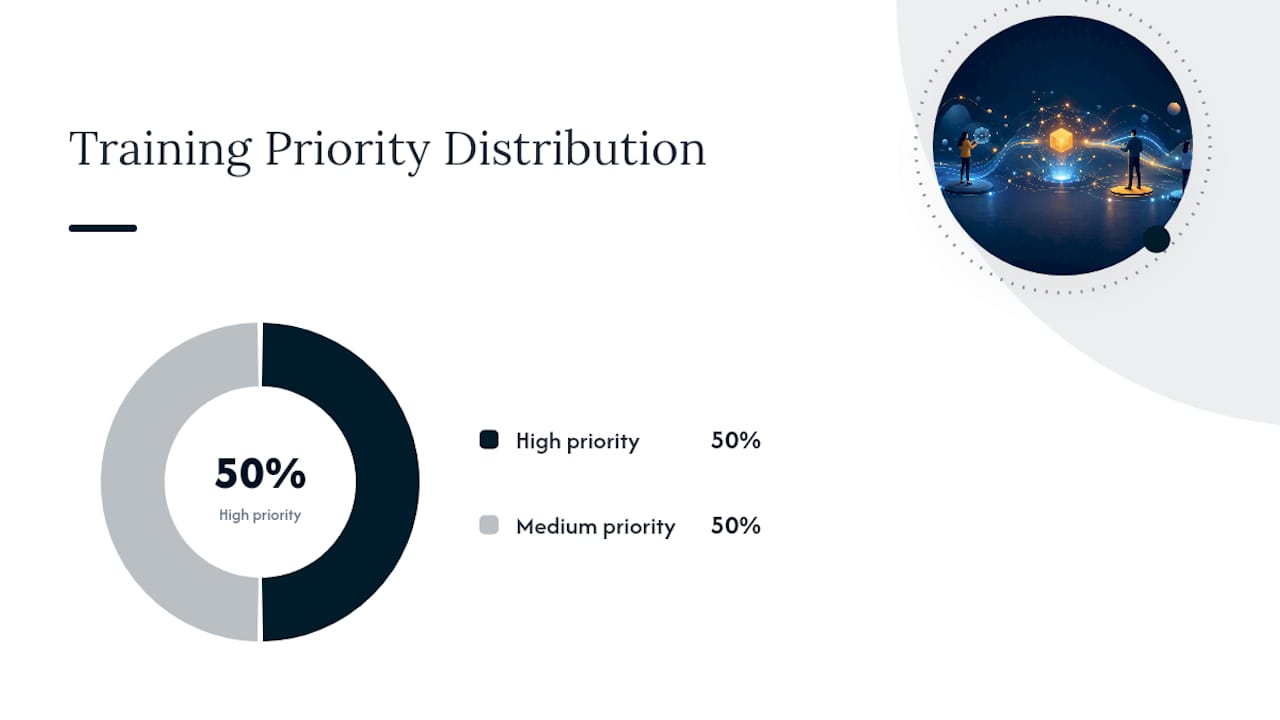
The Bureau of Labor Statistics publishes occupational employment data that’s genuinely useful here. If you’re deciding whether to prioritize training for 40 customer service reps or 12 finance analysts, BLS figures on role concentration help you estimate the scale of the opportunity before you commit budget.
Your deliverable at the end of this phase should be a two-page skills-gap summary: which role clusters have the biggest AI opportunity, what’s blocking them today, and a rough 90-day timeline for addressing the top two clusters first.
What Learning Objectives Should Tie to Business Outcomes?
Vague objectives like “improve AI literacy” don’t survive a budget conversation with the CFO. Every learning objective in your program should map directly to a business metric someone in leadership already cares about: time saved, error rate, compliance incidents, or adoption of an approved tool.
Start by asking what the business outcome actually is, then work backward into the skill. If the goal is reducing report-writing time in finance, the learning objective isn’t “use ChatGPT.” It’s “draft a first-pass variance report using an approved AI tool, then validate and correct it in under 20 minutes.” That’s testable. “Understand AI” is not.
Useful KPIs to track from week one include:
- Time saved per task (measured against a documented baseline, not employee self-report)
- Adoption rate of approved tools (percentage of trained employees using them weekly)
- Error or rework rate on AI-assisted output versus manual output
- Compliance incidents tied to AI use (should trend to zero, not just decrease)
Build a short role-competency table before you write any curriculum. It forces clarity on what “good” looks like for each cluster.
| Role | Core competency | Success indicator |
|---|---|---|
| Customer service rep | Draft and edit AI-generated responses accurately | Response time drops, tone stays on-brand |
| Financial analyst | Validate AI-assisted forecasts against source data | Rework rate declines month over month |
| Marketing associate | Use AI for research and first drafts, not final copy | Time-to-publish shortens |
Set your baseline before training starts, not after. Measure current time-on-task or error rate for two to four weeks, then reassess on the same cadence, monthly for fast-moving roles and quarterly for lower-frequency tasks, so you’re comparing apples to apples when you report results to leadership.
How Do You Design a Role-Specific AI Curriculum?
The mistake most companies make is buying one licensed course and calling it AI training for employees. That works for general literacy, but it does nothing for a finance analyst who needs to validate model outputs against actual ledgers, or a customer service rep who needs to know when not to trust a drafted response.
A workable curriculum has five components, and every role pathway should touch all five, just at different depths:
- AI literacy: what generative AI can and can’t reliably do, including hallucination risk and where accuracy breaks down.
- Applied prompting: structuring requests for the employee’s actual, recurring tasks, not generic examples.
- Workflow integration: where AI fits into an existing process without creating a parallel shadow system.
- Ethics and data handling: what’s safe to paste into an external tool, and what absolutely isn’t.
- Hands-on projects: a real task, not a simulation, completed with instructor or peer review.
Learning platforms like Go1 recommend this same five-part structure, pairing role-based pathways with ongoing reinforcement rather than a one-time session, because a single workshop rarely survives contact with a busy quarter.
Example pathways look different by cluster. Customer service reps might spend three sessions on response drafting and escalation judgment. Finance teams need more time on validation and less on creative prompting. Marketing gets latitude to experiment with tone and format; leadership needs a condensed version focused on governance, risk, and how to sponsor adoption visibly.

Every pathway should end with a capstone, not a quiz. A capstone for a customer service rep might be a week of shadowed AI-assisted ticket handling with a supervisor reviewing outcomes. For a finance analyst, it’s a completed forecast with a documented validation process attached.
Pro Tip: Build curriculum around transferable skills like prompt structuring and output validation instead of a specific tool’s interface. Tools change every 12 to 18 months; the underlying judgment skills don’t. That’s how you avoid rebuilding your entire program every time a vendor updates its product.
Which Training Delivery Methods Actually Drive Adoption?
Picking the wrong delivery method is the fastest way to burn goodwill on a training initiative that had good bones. Microlearning works for reinforcing a concept employees already understand. It fails completely for teaching judgment, like knowing when an AI-drafted response needs a human rewrite.
Live cohort training earns its cost when a role involves genuine risk or ambiguity, finance, legal-adjacent work, anything customer-facing at scale. Coach-led capstones are worth the investment for roles where the AI-assisted workflow will become permanent and mistakes are expensive to unwind later.
| Modality | Best for | Time investment | Risk level of role |
|---|---|---|---|
| Async microlearning | Reinforcement, tool updates | Low (brief sessions) | Low |
| Live cohort workshops | New skill judgment, Q&A | Medium (2-4 hours/week) | Medium |
| Coach-led capstones | High-stakes, permanent workflow change | High (multi-week) | High |
| Manager-led office hours | Ongoing troubleshooting | Low, ongoing | Any |
Engagement tactics matter as much as the modality. Manager enablement, training the managers first so they can answer questions and model use, consistently outperforms top-down mandates alone. Naming a handful of “AI champions” per department, employees who are already comfortable and enthusiastic, gives peers a low-stakes person to ask instead of a help desk ticket.
Accessibility can’t be an afterthought here. Employees with different learning needs may need materials in multiple formats, captioned video, extended time on hands-on exercises, or one-on-one coaching instead of group cohorts. Build these accommodations into the plan from the start rather than retrofitting them after a complaint.
What Does a Realistic AI Training Pilot Look Like?
A pilot exists to catch problems before you’ve spent real budget scaling them. It should run 30 to 60 days, cover one role cluster, and have success criteria written down before day one, not decided retroactively based on how it feels.

Design the pilot around a narrow question: can this specific role cluster reduce time-on-task or errors using an approved AI workflow, without creating new compliance risk? Everything in the pilot should serve that question.
A sample timeline:
- Weeks 1-2: Finalize curriculum, brief managers, set baseline metrics.
- Weeks 3-6: Deliver training, track engagement and early usage.
- Weeks 7-8: Measure against baseline, gather qualitative feedback from participants and managers.
- Week 9: Decide: scale, iterate, or pause.
Budget varies widely based on how much customization and instructor-led time you need. A lightweight pilot using existing online courses and internal facilitation can run in the low thousands of dollars. A fully customized program with instructor-led sessions, platform integrations, and consultant support costs considerably more, and the biggest cost driver isn’t the content itself. It’s the hours spent tailoring workflows to your specific systems and data environment.
Use pilot results honestly. If adoption stalled because managers weren’t bought in, fix that before scaling, don’t just add more training hours. If the metric moved but employees flagged confusion about data handling rules, that’s a governance gap, not a curriculum gap, and it needs a different fix.
What Policies Should Govern Employee AI Training?
Training employees to use AI without a governance framework is how sensitive data ends up inside a public model’s training set. This isn’t hypothetical caution. The rapid, well-documented growth in generative AI adoption means employees are already experimenting with these tools, often without anyone in IT or HR knowing.
Before you train a single employee, get four policies in writing:
- Acceptable use policy: which tools are approved, and what tasks they’re approved for.
- Data handling rules: what categories of data (customer PII, financial records, proprietary code) can never go into an external tool.
- Model access controls: who can use which tools, and whether enterprise or consumer-grade accounts are required.
- Escalation path: who employees contact when they’re unsure if something is allowed.
Training should teach employees to recognize the difference between an internal, sandboxed AI tool and a public consumer model, and why that distinction matters for anything containing client information. Run a short exercise during training where employees identify which of several sample requests would be safe to send to an external tool and which wouldn’t. It surfaces confusion faster than any policy document read silently.
Statistic Callout: The Department of Labor’s AI Literacy Framework lays out five foundational content areas and seven delivery principles designed specifically to guide organizations through exactly this kind of role-specific, risk-aware program design, rather than leaving employers to improvise governance from scratch.
Coordination between HR, IT security, legal, and the business unit sponsoring the training isn’t optional overhead. It’s the difference between a training program that reduces risk and one that quietly creates new risk while looking productive on a slide deck.
How Do You Measure the Impact of AI Training?
Measurement is where most AI training for employees initiatives quietly fail. Companies track attendance and satisfaction scores, then wonder six months later why nothing about actual work changed. You need three layers of measurement, not one.
Learning metrics capture whether people absorbed the material: completion rates, assessment scores, capstone quality. Behavior metrics capture whether they’re actually using what they learned: tool adoption rate, frequency of use, manager-observed changes in workflow. Business metrics capture whether it mattered: time saved, error reduction, compliance incidents, customer satisfaction shifts.
| Metric layer | Example metric | Collection method |
|---|---|---|
| Learning | Capstone completion and quality score | Instructor or peer review |
| Behavior | Weekly active use of approved AI tool | Platform telemetry or manager check-in |
| Business | Time saved on target task | Time-tracking comparison to baseline |
| Business | Compliance incidents related to AI use | IT security incident log |
Collect this through a mix of short pulse surveys, tool usage telemetry where available, and direct productivity measures like time-on-task comparisons. Avoid relying solely on self-reported confidence, which tends to rise even when actual behavior hasn’t changed much.
Run a retrospective every 90 days for the first year. Ask what content didn’t land, which roles need a different pathway, and whether the business metrics moved enough to justify the investment. Give yourself realistic timelines. Learning metrics show up in weeks. Behavior change usually takes one to two full quarters. Business impact, especially anything tied to error reduction or compliance, often takes two to three quarters before you can attribute movement confidently to the training rather than other factors.
Should You Build AI Training In-House or Hire a Consultant?
The decision usually comes down to four factors: how fast you need to move, how much internal L&D and IT security capacity you actually have, how complex your compliance environment is, and how many systems the training needs to integrate with.
A single-department pilot with low data sensitivity is often manageable in-house, especially if you already have an L&D function. Multi-department rollouts touching financial data, healthcare information, or client-facing systems usually benefit from outside expertise, not because internal teams aren’t capable, but because the risk assessment work requires security specialists most HR departments don’t have on staff.
A credible consultant engagement should deliver, at minimum, a documented AI readiness assessment, a role-based curriculum outline, a security and data-handling risk review, and a measurement framework tied to business KPIs, not just a generic training deck with your logo added.
The sanest decision flow: run a small internal pilot first to learn your organization’s actual friction points, bring in consultant expertise to augment the areas where internal capability falls short (usually security review and curriculum customization), then move to a managed program once you’ve proven the model works at small scale.
Watch for red flags during vendor selection. If a consultant can’t explain how they’d handle a specific data-sensitivity scenario relevant to your industry, or their “customized” curriculum looks identical to their public course catalog, that’s a warning sign worth taking seriously.
Pro Tip: Ask any AI training vendor exactly how they’d handle your organization’s highest-risk data scenario before signing anything. A vague or rehearsed answer tells you more than their sales deck ever will.
What I’ve Learned Watching AI Training Programs Succeed and Fail
The programs that fail almost always skip the readiness assessment and jump straight to buying licenses for a course platform. The programs that work treat AI training as change management first, tool literacy second, exactly the lesson CVS built its internal AI Learning Academy around, pairing role-specific workshops with visible leadership engagement rather than a single generic module.
One anonymized pattern worth noting is that organizations that measured a real baseline before training, even something as simple as time-on-task for one recurring report, consistently reported clearer ROI conversations with leadership than those that skipped it. That single step, unglamorous as it is, tends to separate programs that get renewed funding from ones that quietly disappear after the first budget cycle.
How tekRESCUE Supports Responsible AI Training Rollouts
Most AI training vendors sell you a course library and leave the security review to someone else, usually nobody. tekRESCUE built its approach the opposite way: the training only ships after the risk assessment, not instead of it.
tekRESCUE’s AI Profit & Growth Assessment maps where AI can realistically create efficiency in your organization and flags the vulnerabilities that come with adopting it, drawing on three decades of combined IT and cybersecurity experience. That’s a meaningfully different starting point than a generic curriculum built for a different industry’s risk profile.
An initial engagement typically produces a documented readiness assessment, a role-specific rollout roadmap, and a security review covering data handling and tool access, the same deliverables a credible consultant should provide, built specifically around your workflows rather than adapted from a template. If your organization is ready to move past the pilot-and-hope stage, visit tekRESCUE to schedule an AI Profit & Growth Assessment and get a roadmap built around your actual risk profile and business goals.
Sources
- US Department of Labor releases AI literacy framework providing foundational content areas, delivery principles to guide nationwide efforts | U.S. Department of Labor
- CS50’s Introduction to Artificial Intelligence
- Bls